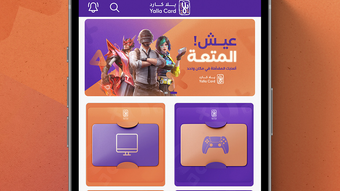

Yalla Card: Instant Gaming Access
Overview
Yalla Card is a desktop application designed to streamline the purchase of gaming products through a dedicated platform. The software enables users to browse and acquire a variety of gaming-related items, including digital games and accessories, with a focus on speed and convenience. It caters primarily to gamers seeking fast access to new releases and in-demand products without the delays associated with traditional retail channels. The app supports instant delivery, allowing users to begin playing or using their purchases immediately after purchase. This makes it ideal for time-sensitive needs, such as acquiring a new game before a weekend event or securing limited-edition merchandise.
The software is developed for both Windows and Mac platforms, offering cross-device accessibility for a broad audience. Its target users include casual gamers, competitive players, and enthusiasts who value efficiency and a smooth shopping experience. The application emphasizes a secure transaction environment, supporting multiple payment methods to ensure flexibility and safety during checkout. While the developer did not provide additional details about the company or its background, the focus on instant delivery and user-friendly navigation suggests a service built around modern digital consumption habits. Real-world usage scenarios include quick game purchases, managing a digital library, and acquiring gaming peripherals through a single interface.
Key Features & Capabilities
- Instant Delivery – Purchased games and digital products are delivered immediately after payment confirmation, eliminating wait times common with physical shipments.
- Wide Product Selection – Offers a diverse range of gaming products, including new releases, seasonal titles, and popular accessories, all accessible within a single application.
- Secure Payment Integration – Supports multiple secure payment options, ensuring users can complete transactions safely and with confidence.
- User-Friendly Interface – Designed with intuitive navigation and clear visual cues, allowing users to browse, search, and purchase products with minimal effort.
- Fast Access to Gaming Content – Enables users to quickly locate and acquire games or items without navigating multiple websites or platforms.
These features collectively enhance the user experience by reducing friction in the purchasing process. For example, a user preparing for a gaming tournament can browse the app, select a required title, and start playing within minutes. Similarly, a collector may use the app to find rare or limited-edition items without leaving their desktop environment. The integration of secure payment methods ensures that sensitive data is handled with care, while the immediate delivery function supports on-demand access to digital content. This combination of speed, variety, and security positions Yalla Card as a practical tool for modern gaming consumers.
User Interface, Workflow & Performance
The user interface of Yalla Card is structured around simplicity and direct access to core functions. Navigation is designed to minimize steps between browsing and purchasing, with clearly labeled menus and an organized layout that prioritizes visibility of popular and trending items. The workflow follows a logical progression: discover, select, pay, and access—each stage optimized for speed and clarity.
Users can search for specific products using keywords or filter results by category, price, or release date. The application’s performance appears consistent with typical desktop software behavior, though exact resource usage details were not specified. The developer did not provide information on CPU or RAM consumption, so general assumptions about efficiency cannot be confirmed. Stability is expected to be reliable, given the app’s focus on delivering a seamless experience. No reports of crashes or freezes were mentioned in the provided data.
Overall, the workflow supports efficient shopping with minimal interruptions. The design emphasizes usability, making it accessible even to users unfamiliar with digital storefronts. While performance benchmarks were not included, the emphasis on instant delivery suggests optimized backend operations. The app’s lightweight footprint of 45 MB indicates a compact design, which may contribute to faster load times and lower system impact. Users can expect a responsive interface, though real-world responsiveness may vary based on individual hardware configurations.
Compatibility & System Requirements
Yalla Card is available for both Windows and Mac operating systems, making it accessible to a wide range of desktop users. The software is compatible with the latest versions of these platforms, though specific version numbers were not listed. Installation requires approximately 45 MB of disk space, which is considered a minimal footprint for a desktop application.
Exact system requirements were not listed, including details about minimum processor speed, RAM, or graphics capabilities. The developer did not provide additional information on hardware compatibility. Users should ensure their system meets general desktop software requirements for smooth operation. Compatibility information is limited to the operating systems mentioned, with no indication of support for Linux, mobile devices, or web-based access.
Pros and Cons
Pros
- Instant delivery of gaming products after purchase
- Wide selection of digital games and accessories
- Multiple secure payment options for safe transactions
- Intuitive, user-friendly interface for easy navigation
- Lightweight design at only 45 MB
Cons
- Exact system requirements were not specified
- Platform compatibility details beyond Windows and Mac are unclear
- No information on long-term performance or stability under heavy use
- Developer background not disclosed
- Updates and maintenance schedule not provided
FAQ Section
Is Yalla Card compatible with my Windows or Mac device?
Yes, Yalla Card is designed to run on both Windows and Mac operating systems. Specific version requirements were not listed, so users should ensure their system meets general desktop software standards.
Is the software free to download and use?
Yes, Yalla Card is available at no cost. The application can be downloaded and used without any subscription or hidden fees.
Are my payment details secure when using Yalla Card?
The app supports multiple secure payment options to protect user data during transactions. While the exact security protocols were not specified, the inclusion of secure payment methods indicates a focus on transaction safety.
Can I use Yalla Card offline after installation?
Based on the provided information, the software requires an internet connection for browsing, purchasing, and accessing digital products. Offline functionality was not mentioned.
How often are updates released for Yalla Card?
The update schedule for Yalla Card was not disclosed. Users are advised to check the official source for the latest version and any available patches or improvements.
Final Thoughts + CTA
Yalla Card presents a focused and efficient solution for gamers seeking quick access to digital products. Its emphasis on instant delivery, a broad product catalog, and secure payments makes it a compelling choice for users who prioritize speed and convenience. The lightweight design and cross-platform availability further enhance its accessibility. While some details, such as system requirements and developer background, remain unspecified, the app delivers on its core promise: a streamlined path from browsing to playing.
For gamers who value time, simplicity, and reliability, Yalla Card offers a practical desktop tool that aligns with modern digital consumption habits. Whether acquiring a new title or upgrading gaming gear, the app supports a frictionless experience. With no cost to download and a clear focus on usability, it stands out in the gaming software space.
Download Yalla Card now







